
使用 Gradio、LLaMA 和 OLLAMA 建立文字冒险游戏
自 GPT-2 以来,开发者一直使用大型语言模型(LLM)来开发文字游戏,但设置起来很困难。有了 Gradio、LLaMA 3 和 OLLAMA,在你自己的电脑上免费本地运行文字游戏变得超级简单。
在冒险开始之前,你可以了解更多关于 Gradio、LLaMA 和 ollama 的背景: 使用 Ollama 运行您自己的 ChatGPT 和 Copilot
就像上面的博客文章一样,将使用 ollama API,建议使用 llama3
模型。假设你已经拉取了模型:def generate_chat_response(prompt, history = None, model= 'llama3:instruct'):
if model is None:
model = shared.selected_model
messages = []
if history:
for u, a in history:
messages.append({"role": "user", "content": u})
messages.append({"role": "assistant", "content": a})
messages.append({"role": "user", "content": prompt})
data = {"model": model, "stream": False, "messages": messages}
response = requests.post(
config.ollama_url + "chat",
headers={"Content-Type": "application/json", "Connection": "close"},
data=json.dumps(data),
)
if response.status_code == 200:
bot_message = json.loads(response.text)["message"]["content"]
return bot_message
else:
print("Error: generate response:", response.status_code, response.text)
游戏界面
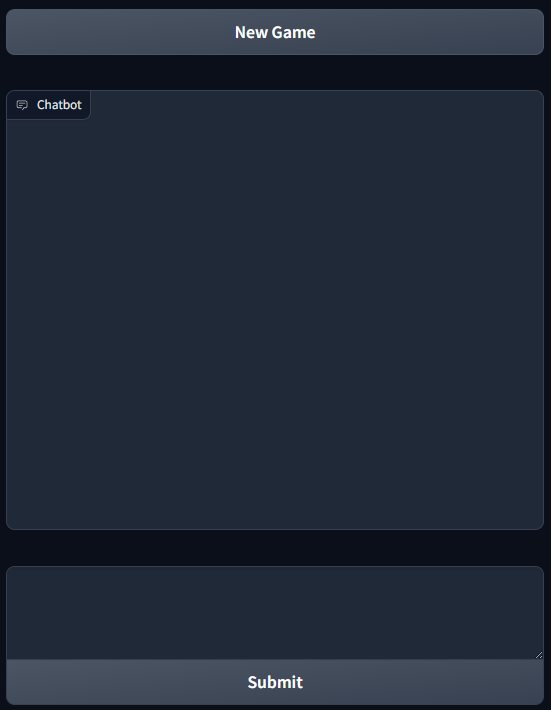
游戏界面不太直观,但在这篇博客文章中应该很容易解释:
import gradio as gr

# Game Interface
with gr.Blocks() as demo:
    textbox = gr.Textbox(elem_id="input_box", lines=3, min_width=800)
    chatbot = gr.Chatbot(show_copy_button=True, layout="panel")
    submit_btn = gr.Button(value="Submit")
    with gr.Blocks():
        nem_game = gr.ClearButton(value='New Game', components = [chatbot])
        chat_interface = gr.ChatInterface(
            fn=take_action,
            textbox=textbox,
            chatbot=chatbot,
            submit_btn=submit_btn,
            retry_btn=None,
            undo_btn=None,
        )
        nem_game.click(fn=start_new_game, output=chat_interface.chatbot_state)

if __name__ == "__main__":
    demo.launch()
除了使用 Gradio 设置游戏界面外,当按下「New Game」按钮时,关于游戏背景和规则的指令会发送给 LLM。一个非常好的游戏指令范例可以在 https://github.com/fladdict/llm_games 找到。将 <to be inserted> 替换为提示词:
game_prompt = """
<to be inserted>
"""

game_instruction = ""

def start_new_game():
    global game_instruction

    response = generate_chat_response(prompt=game_prompt)
    game_instruction = response

    # clean up chat history
    return []
game_instruction 的副本被保存以供稍后使用。
以下是按下「New Game」按钮时 LLM 响应的范例:
玩家现在可以按照指示开始玩游戏,并输入他们的行动。
然而,Gradio 中的聊天机器人组件不知道游戏提示词和指令。这是因为我们在开始新游戏时跳过使用聊天机器人与 LLM 通信。为了解决这个问题,take_action 函数帮助将提示词和指令放在历史记录的开头,然后将它们传递给 LLM:
def take_action(prompt, history = None, model = None):
    global game_instruction
    global game_prompt

    starting = [(game_prompt, game_instruction)]
    if len(history) > 0:
        starting.extend(history)

    return generate_chat_response(prompt, history=starting)
让我们开始冒险吧!
我的冒险
以下是我在撰写时的冒险:
游戏开始崩溃。它不再响应故事进度,而是响应多项选择,与之前的响应不同。这是因为聊天历史已经达到 8k 个 token,这是模型一次可以处理的最大 token 数量。我们如何解决这个问题?我们可以使用支持更多上下文的不同模型吗?还是我们应该总结故事进度,然后将其传递给模型?这是你真正的冒险了!

评论
请接受“功能性”Cookie 类别以查看和发表评论。
评论加载失败。您可以重试,或前往 GitHub 查看讨论。
在 GitHub 上查看